
Picture an old government office. Every application, every permit, every file lives in a folder, and every folder sits in a registry that has grown for decades. The clerks are good at their jobs. But they follow rules written a long time ago, and some of those rules made sense for a small office, not for one that handles thousands of cases an hour.
The heart of the cluster scheduler, the qmaster, is such an office. Every job, queue, host and user is a case file in its registry. That registry is a data library called CULL, and its roots go back to the early 1990s. When I joined the Grid Engine group in 1999, it was already there, and it has outlived several generations of the product around it. It is generic and flexible: one set of functions can file, search and copy any kind of object. Flexibility like that has a price, and in a busy cluster that price is paid all day long.
For the upcoming 9.2 release we went through the registry and looked at what the clerks actually spend their time on. This post is about what we found and, above all, about the numbers: 9.1 against the first alpha of 9.2.
Where the time went
Two habits stood out.
Photocopies of the blank form. Every folder in the registry carried its own photocopy of the blank form for its kind of case, so a clerk could see which line means what. That’s convenient. It also means that every new folder, every copy of a folder and every folder that arrives from another office triggers another photocopy of a form that never changes. In one of our test runs the office made 186 million of these copies, about 38.6 GB worth of paper, for metadata that is identical every time.
Reading excerpts from top to bottom. Departments rarely need a whole case file. The scheduling department, for example, the one that decides where each job runs, works with excerpts: just the lines it needs. But finding a particular line in an excerpt meant reading it from the top until the right line turned up. In the same run, clerks did that 152 million times and read 2.3 billion lines along the way.
Neither habit is a bug. Both are what you get when a design from a smaller era meets today’s scale.
And the old office did its job remarkably well. Even with CULL, Grid Engine ran a single cluster with more than a million cores in an experiment on AWS in 2018. Cleaning out the registry isn’t about fixing something that failed. It’s about getting ready for the next step: larger clusters, more jobs, more queries, on the same qmaster host.
How we measured
We compared the current 9.1 release line with 9.2.0alpha1, using the same benchmark on the same machines:
- An optimized release build of each version, with the qmaster on a dedicated host with 16 cores.
- Job lifecycle: submit about 5,000 short jobs and let the cluster run them to completion on four execution hosts.
- Scheduler load: 1,000 simulated hosts and a long list of pending jobs, 25 consecutive scheduling runs.
- Every value is the mean of three runs; the runs of one version stayed within a few percent of each other.
The numbers include everything that went into 9.2 so far, so the typed object model of the next post (coming on November 27) is part of them, too. And 9.2.0alpha1 is an alpha: until the first customer shipment of 9.2 the numbers can still change, in either direction.
The results
Scheduling: nearly twice as fast
This is the headline. Under scheduler load, the 25 scheduling runs took 64.6 s in 9.1 and 34.8 s in 9.2.0alpha1: scheduling is 1.9× as fast. The scheduler thread needed half the CPU (64.4 s → 32.2 s), and the step that actually decides where each job goes, the dispatch, is 1.9× as fast as well (47.9 s → 24.7 s). The whole qmaster used 111.8 CPU seconds for these runs in 9.1 and 56.6 in 9.2.0alpha1.
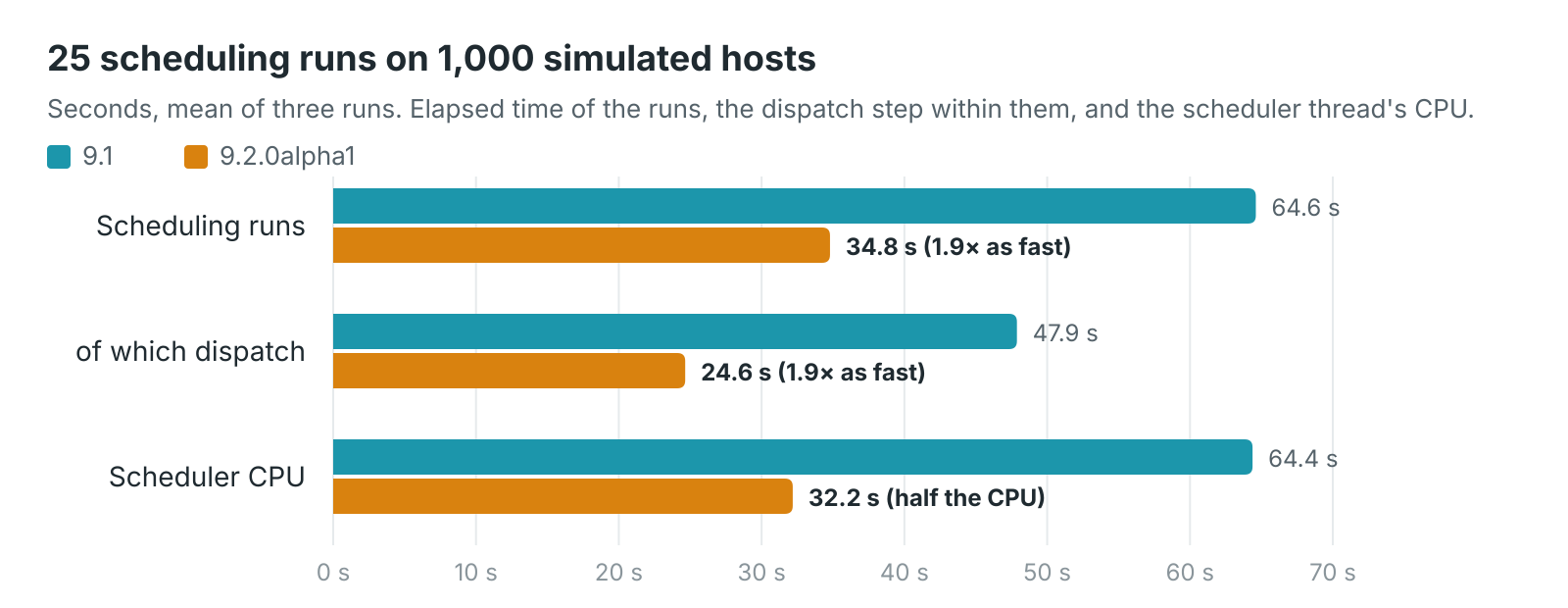
Why does that matter more than any other number in this post? The scheduler works in rounds: it takes a snapshot of the cluster, decides where pending jobs go, and starts over. While a round runs, a newly submitted job waits for the next one. A round that takes half the time means jobs start sooner, the rounds can come more often, or, at the same interval, one round can look at more hosts and more jobs. That last point is the next step from the million-core experiment above: larger clusters on the same qmaster host.
CPU: the departments got their afternoons back
Running the 5,000 jobs from submission to the last finished job took the qmaster 37 % less CPU, 327 seconds in 9.1 against 206 in 9.2.0alpha1. Broken down by department:
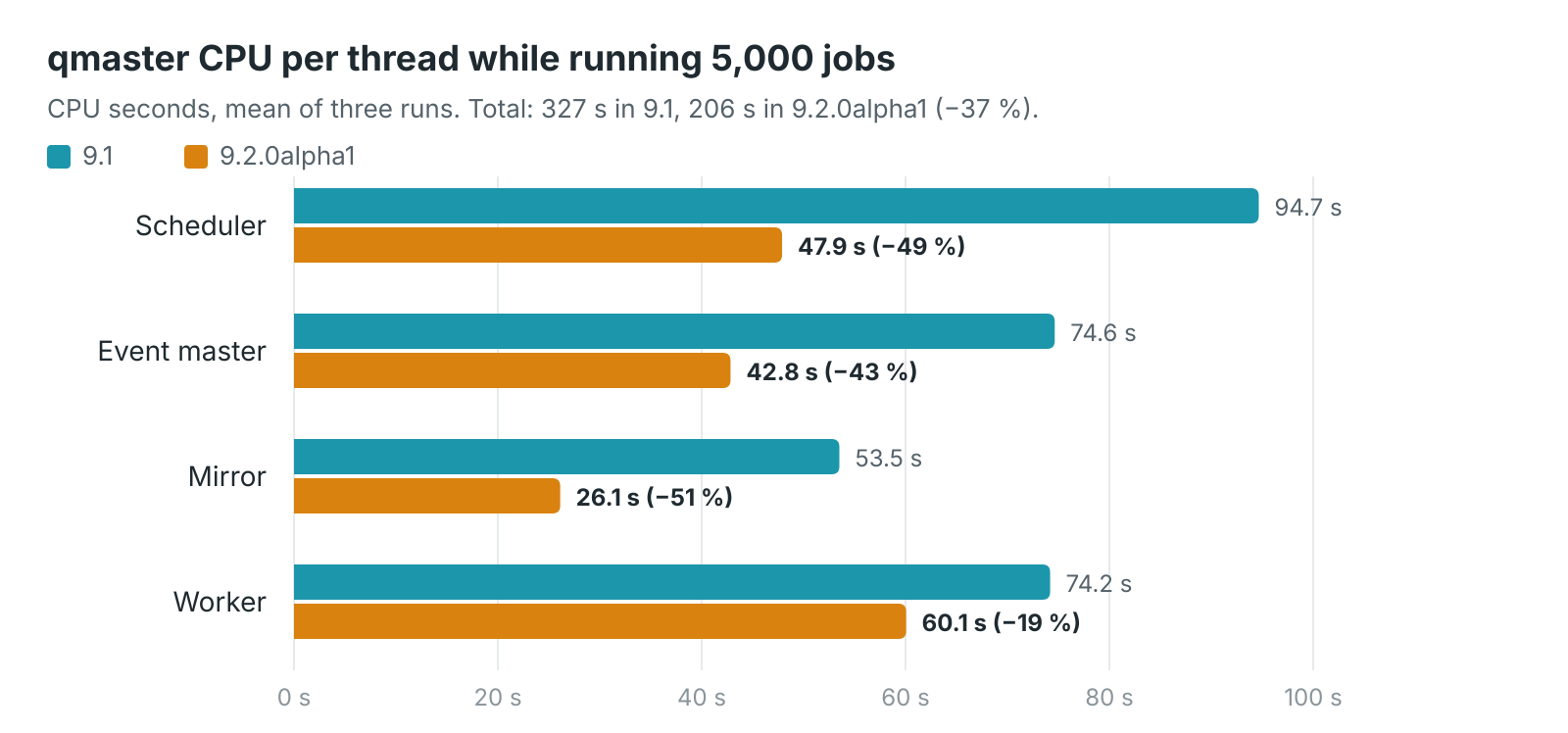
The scheduler decides where jobs run, the event master (the mail room) tells everyone what changed, the mirror keeps the scheduler’s own copy of the records, and the workers at the front desk handle requests.
Both habits from above are gone: zero photocopies of the blank form, zero top-to-bottom searches.
Memory: a smaller office
The qmaster’s peak memory went down in both scenarios:
| Scenario | 9.1 | 9.2.0alpha1 | Change |
|---|---|---|---|
| Job lifecycle | 439 MB | 333 MB | −24 % |
| Scheduler load | 1,004 MB | 591 MB | −41 % |
Queries
qstat -f and qstat -ext over the full job list answer 1.8× and 1.6× as fast (0.26 s → 0.15 s and 0.27 s → 0.17 s).
Why the wall clock barely moves
Running the 5,000 jobs finished only 12 % sooner (236 s → 209 s), even though the qmaster burned more than a third less CPU.
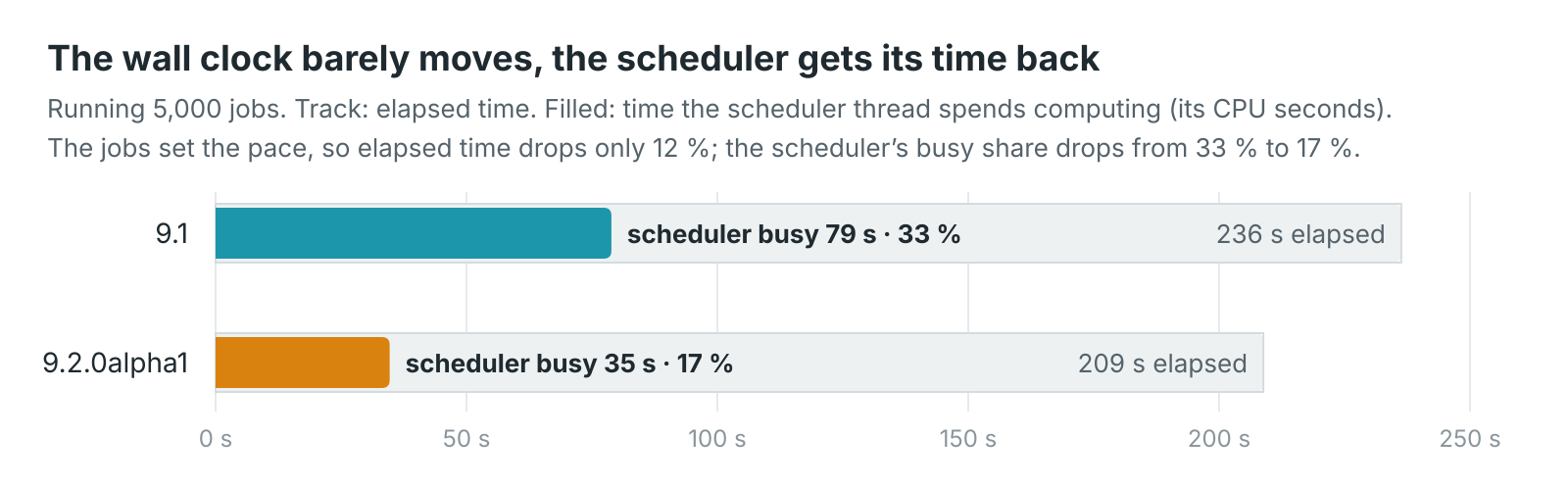
That’s expected: in this test the jobs themselves set the pace, since four hosts can only run so many jobs at once. What changed is how much of its time the qmaster is busy. In a small test that’s spare capacity. In a large cluster it’s the difference between a scheduler that keeps up and one that falls behind.
The fine print
Not everything got better. Submitting the 5,000 jobs took 7 % longer (35.7 s → 38.2 s), and the front desk spent about a quarter more CPU on it, because part of the work moved from later stages into submission. We decided that’s a good trade, because a job is submitted once and looked at many times. A qstat -j over all jobs also takes a little longer, 0.60 s instead of 0.54 s. Both are costs, and you should know about them. They are also the places we are still looking at before the release.
What it means for you
- More headroom. The same qmaster host handles more jobs, more hosts and more queries before it becomes the bottleneck.
- Faster scheduling. Scheduling runs under load are nearly twice as fast, so new jobs start sooner after they become eligible.
- Less memory. Up to 41 % less at peak in our tests, which matters most on large clusters with long pending lists.
- Faster answers. Monitoring scripts and users running
qstatget their answers sooner, and they slow down the rest of the office less while doing so. - Nothing to change. No new options, no configuration, no change in behavior. The office simply works faster.
Availability
The changes are part of the 9.2 release of both Open Cluster Scheduler and Gridware Cluster Scheduler; the numbers above were measured on 9.2.0alpha1 and may still change until the first customer shipment. The source code is already public in the clusterscheduler repository on GitHub.
Next: forms that can’t be filled in wrong
Cleaning out the registry made the office faster. It didn’t change how the forms are filled in, and that’s where the next, bigger step comes in. Today, a clerk can still write a number into the field for a name, and the mistake only shows when that piece of code actually runs — sometimes in production. In the next post (coming on November 27) we’ll look at TOM, the typed object model that replaces CULL: forms where a wrong entry simply doesn’t fit, checked by the compiler before the code ever runs.